seeCph Backend API
seeCph Backend API#
Project Start
21 august, 2026
About the project#
seeCph is a REST API that gathers events in Copenhagen in one place. Events are fetched automatically from API every night and can also be created by approved organizers and admins. Users can search and filter events, save favourites and like events, and organizers can advertise their events on the front page. Read some of my progress during the project below or check the project out on github, where you can find the API documentation.Planning
25 august, 2026
Creating user stories helps establish a clearer grasp of the project scope and makes future analysis much more straightforward. I started by mapping out a rough initial domain model, keeping in mind that it will naturally evolve as the project progresses.
The primary focus is identifying the core entities, their relationships, and the key interactions users will have with the system. This foundation ensures that subsequent architectural decisions and database designs align with actual requirements.
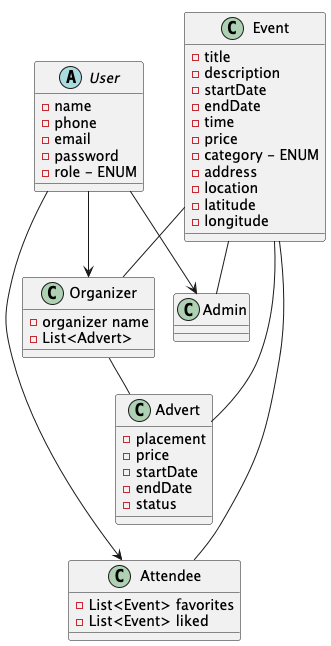
Domain model JPA
30 august, 2026
Class Diagram#
Working from the domain model and user stories, I started creating a class diagram and mapping out the relations between entities.
While building the class diagram, I coded alongside it — starting with all entities from the domain model to get a better overview and catch anything I might be missing.
I changed
Eventto an abstract class because I wanted to support both one-time and recurring events. In the end, I only neededEventbecause I decided to store dates in aSetinstead of splitting into subclasses.After that, I added the
ENUMSI needed and filled in their constants.JPA#
Next was wiring up the relations through JPA annotations. I started simple —
@OneToOne,@OneToMany,@ManyToMany— and built from there. Two areas needed extra research: making annotations forSetsfromCollections, and handlingabstractentity classes.Sets
@ElementCollectionabstract classes
@Inheritance(strategy = InheritanceType.SINGLE_TABLE)Every subclass of an abstract entity goes in the same table, making
CRUDoperations faster in the database without the need for anyJOINS.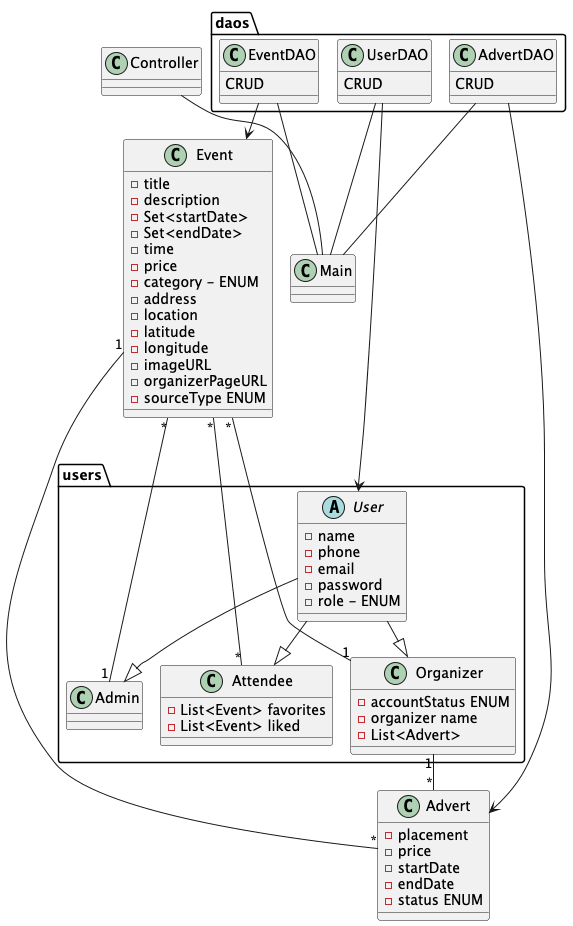
Class Diagram 1.0 Test
4 September 2026
This week was about finishing tests for my entity DAOs’ basic
CRUDoperations.To make it possible to test properly, I needed to add exception handling to all
CRUDoperations. To make this easier and more future-proof, I added anabstract generic <T> classwith all basic operations.This will make it easier to maintain the code in the future, both when adding new entities or updating existing ones.
When writing the
@Tests, I also updated my entities with overriddenequals()andhashCode()methods to compare objects in the tests.I also added
@PrePersistand@PreUpdatemethods to set certain variables based on others, which simplifies maintenance by keeping entity lifecycle logic directly in its own class.@PrePersist private void prePersist() { this.status = !LocalDate.now().isBefore(startDate) && !LocalDate.now().isAfter(endDate); }@PreUpdate private void preUpdate() { this.status = LocalDate.now().isBefore(startDate) && !LocalDate.now().isAfter(endDate); }Refactoring with a generic abstract class with exception handling was challenging, but satisfying when it was done ✅
IntegrationTests for
Event,Advertand alluserstook a big effort to keep track of all relations and getting them right. But it helped to find some flaws in my code, to persist, update and delete everything the way I wanted it to behave.API Setup
18 september, 2026
It’s was time to add
APIdata, so have worked on setting up a call that gets data from Ticket Master and only events happening in Copenhagen, Denmark. Then using the received json file turn convert it to dto and then convert it to an entity, to persist it to the database.Using
ObjectMapperand@JsonIgnorePropertiesis pretty new libaries to use. It makes it so much easier to fetch data and convert into dto.For it to work, the dto classes / records have to be set up the right way, so it mirrors the data from json with the data you want. When setup right, it kinda feels like magic. Just make sure the dto “tree” starts from where you collect data.
It took some time to figure out exactly what data i wanted and how it should be represented in my entity. Cause I had to make it generic enough for it, to also work for other API’s and data fetching, while still getting relevant data to use.
Wished I used more time for groundwork to fugure out the variables for my
Evententity.Found an easy way to choose category from my
ENUMdirectly when the dto is made, that makes it much easier in my service class TicketMasterConverter or any new ones. But also if I need to change anything it myENUMI only have to do it in one place when I don’t have any switches.@JsonCreator public static EventCategory fromLabel(String label) { if (label == null) return OTHERS; return events.getOrDefault(label.toLowerCase(), OTHERS); }And then every
ENUMhas String label to catch and give the right one.Endpoints
25 september, 2026
Figuring out how to structure my code to handle my endpoints took a lot of time. The goal was to make the code readable and easy to maintain. Structuring it this way helps keep my classes aligned with the Single Responsibility Principle. For now, I ended up structuring it like this:
HTTP Request: User input
↓ Controller: Adds endpoints
↓ Handler: Manages user input validation & HTTP responses
↓ Service: Executes business logic
↓ DAO: Interacts with the databaseHandlers: Takes care of what happens when calling the different routes, manage user input validation using Javalin’s
Validator, and set/return HTTP status messages. I will also implement aLoggerhere later on.Controllers: Takes care of linking routes up with the methods in handlers. Here, I use Javalin’s
EndpointGroupinterface to add all routes in each controller.Dependency Injection: To handle dependency injection, I created an
ApplicationConfigclass that makes sure DAOs, services, handlers, and controllers get what they need, and adds all controller endpoints in one method.
public class ApplicationConfig implements EndpointGroup {

    private final EventController eventController;
    private final UserController userController;
    private final AdvertController advertController;

    public ApplicationConfig(EntityManagerFactory emf) {
        // DAOs
        AdvertDAO advertDAO = new AdvertDAO(emf);
        EventDAO eventDAO = new EventDAO(emf);
        UserDAO userDAO = new UserDAO(emf);

        // Services
        EventService eventService = new EventService(eventDAO);
        UserService userService = new UserService(userDAO);
        AdvertService advertService = new AdvertService(advertDAO);

        // Handlers
        EventHandler eventHandler = new EventHandler(eventService);
        UserHandler userHandler = new UserHandler(userService);
        AdvertHandler advertHandler = new AdvertHandler(advertService);

        // Controllers
        this.eventController = new EventController(eventHandler);
        this.userController = new UserController(userHandler);
        this.advertController = new AdvertController(advertHandler);
    }

    @Override
    public void addEndpoints() {
        eventController.addEndpoints();
        userController.addEndpoints();
        advertController.addEndpoints();
    }
}
If
ApplicationConfiggets too big, the plan is to split it up into categories so it remains readable and easy to maintain.To keep the code easier to maintain and build on, I use interfaces to provide a blueprint for new additions and keep method names consistent.
RestAssured
2 october, 2026
RestAssured#
After creating the endpoints, I needed to test if they actually worked as intended. I started by manually testing the connection with an HTTP test on localhost, just a quick positive test to see if it behaved as designed.
Next came the
RestAssuredtests to verify that my handlers returned the correct status codes across different scenarios, covering both positive and negative results. All of this helped ensure the application was working the way I planned.Writing failure tests can be a bit tricky to get right, but as I worked through them, it got easier and easier. Since I had already tested my service layer, I had previously caught and corrected a few mistakes and behaviors in my code. The
RestAssuredtests mainly focused on validating my handlers’ contexts, which went pretty smoothly, though I did notice I needed better error and status handling in a few places.Web-Hook#
I also implemented a
webhookto sync my API events once a day during off-hours at night, when server traffic is minimal. It is set up with GitHub Actions to hit this endpoint:/api/v1/events/ticketmasterWhen sending a request to the endpoint, it also passes a key/password to check against a system environment variable before running the sync. This ensures it cannot be hit by unauthorized users. Once validated, it makes a new thread, running in the background, to run the syncs. This allows the main thread to immediately return a 200 OK status back to GitHub, preventing the HTTP request from timing out if the sync takes too long.
Security
18 october, 2026
Finally, it was time to add security to the application. I started by configuring a token creator to determine what information to include, resulting in this setup:
JWT.create()
        .withIssuer(issuer)
        .withSubject(String.valueOf(user.id()))
        .withClaim("email", user.email())
        .withClaim("name", user.name())
        .withClaim("role", user.userRole().name())
        .withIssuedAt(now)
        .withExpiresAt(now.plusMillis(expirationTime))
        .sign(signingAlgorithm(secret));
The user role was particularly important, as I needed to enforce access control on my endpoints—ensuring, for example, that a standard user cannot modify events or delete other users. Getting this right took some effort because my codebase structure differed significantly from our class example. Most notably, the example used a String for roles, whereas I had already implemented mine using an Enum, but I managed to get it working smoothly in the end.
The values used to create the token, such as the secret key, issuer and token expiration time, are never hardcoded or committed. Locally they are read from a
config.propertiesfile that is listed in.gitignore. When deployed, the application reads the same values from environment variables instead. On the DigitalOcean server, Docker Compose loads them from a.envfile and passes them to the container when it starts, so the Docker image itself contains no secrets. During the build, GitHub Actions gets the values it needs to run the tests from GitHub Secrets.The setup for the login endpoint, along with the authentication and authorization handlers, came together quickly and cleanly:
public Javalin startServer(int port) {
        var app = Javalin.create(this::configuration);
        app.beforeMatched(securityHandler::authenticate);
        app.beforeMatched(securityHandler::authorize);
        // ...
}
Potential improvements for next time:
Allowing users to hold multiple roles.
Implementing token renewal or refresh mechanisms after a set period of activity.
Storing token identifiers to ensure tokens can be invalidated immediately upon logout or renewal.
I also integrated BCrypt for password hashing, which went smoothly since I have used it in previous projects. However, a new addition this time was implementing robust input validation using
Context.bodyValidator()across user creation, login, updates, and password changes.Deployment
25 october, 2026
Finally time for deployment of my REST API, setting up automatic deployment when pushing to main. For this I use GitHub Actions and a Watchtower on DigitalOcean to poll for a new image on Docker Hub.
When pushing the project to GitHub it checks if it’s push or pull request to main.
Push:
- Runs test and Maven builds the project as a fat jar and build a Docker image contain the jar and pushes it to Docker Hub.
Pull request:
- Runs test and Maven builds the project as a fat jar, but nothing is deployed.
If a test fails, the process stops before the Docker steps, so a broken build never reaches the server.
On the DigitalOcean, Watchtower runs as a container next to the application. It polls Docker Hub for a new version of the image and, when one appears, pulls it and restarts the application container with the same settings from
docker-compose.yml.It’s secured using secrets on both ends, the .env and GitHub secrets holds values needed for the process. GitHub holds values needed for the build like
JWTsettings used for tests and Docker Hub username and a secret access token for the push the image. Everything needed when the application is running on DigitalOcean is kept in.env, so the image itself doesn’t contain any secrets.Deployment wasn’t without struggles. The DigitalOcean droplet only has about
1 GBof RAM, and it runs several projects at once, including a database, Caddy and Watchtower, so the containers started to fail.To fix it, I set up a
2 GBswap file, which lets the server use part of the disk as extra memory when the RAM runs out. At the same time I added memory restrictions on each application and freed up over200 MBand it now stable with around550 MBusage of RAM.